
Recently, I had yet another opportunity to implement Easy Auth, this time not on a static page but on an app service hosting a React application with a .NET backend. I’m sharing how applicable this mechanism is, especially in SPA applications that do not require a robust authentication scheme (it is also a brilliant choice for migrating apps from on-premises AD identity management to Azure Entra identity management).
The Mystery of Missing Headers: Backend-Only Security by Design
One of the typical questions developers ask when implementing Azure Easy Auth is: “Why can’t I see the authentication headers in my browser’s developer tools?” The answer reveals the fundamental security principle behind Easy Auth’s architecture.
Azure App Service Easy Auth operates on a security-through-isolation model, where authentication headers are injected exclusively into backend requests. These headers never reach the browser, creating an impenetrable barrier against client-side token theft.
This architectural decision addresses a critical vulnerability in traditional SPA authentication: token exposure to client-side JavaScript. When tokens are stored in localStorage, sessionStorage, or accessible cookies, they become prime targets for Cross-Site Scripting (XSS) attacks. Easy Auth eliminates this attack vector entirely by ensuring tokens never enter the browser’s execution context.
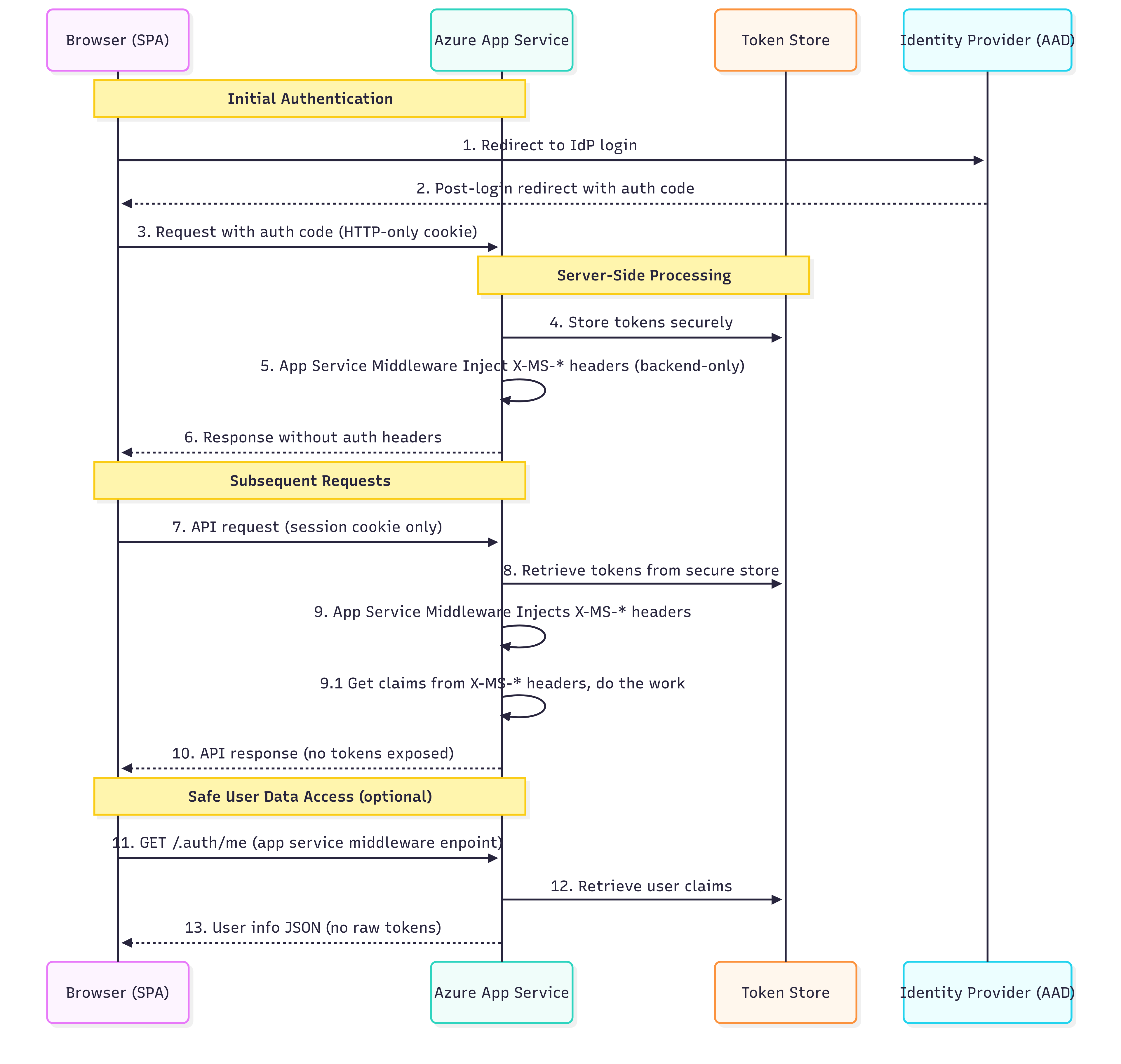
Azure Easy Auth Common Headers – What’s Actually There
X-MS-CLIENT-PRINCIPAL
Base64-encoded JSON with all user claims (identity details, roles, groups). Available only for authenticated requests.
X-MS-CLIENT-PRINCIPAL-ID
Unique user ID from the identity provider (e.g., Entra ID Object ID).
X-MS-CLIENT-PRINCIPAL-NAME
Human-readable username, often an email or UPN. Depends on the identity provider.
X-MS-CLIENT-PRINCIPAL-IDP
Identity provider name (e.g., “aad” for Microsoft Entra ID, “facebook”, etc.).
X-MS-TOKEN-AAD-ACCESS-TOKEN
OAuth access token for Microsoft Entra ID, usable for API calls (e.g., Microsoft Graph).
Available only if token acquisition is configured in Easy Auth.
X-MS-TOKEN-AAD-ID-TOKEN
ID token containing user identity details.
Additionally, it requires correct Easy Auth configuration, which is specific to the identity context, not for API calls.
The Token Store, a Zero-Code Token Management
Azure Easy Auth includes a built-in Token Store that simplifies server-side token handling. This managed feature:
- Automatically captures and stores OAuth tokens from supported identity providers (e.g., Microsoft Entra ID) after successful login.
- Transparently refreshes access tokens* using refresh tokens, if the identity provider and flow support issuing refresh tokens (commonly with the Authorization Code flow).
- Secures token storage using Azure’s platform-level encryption and isolation, tokens are never exposed to the browser or client-side code.
- Provides programmatic token access through the /.auth/me and /.auth/refresh endpoints.
*Refresh Token Case – The Hidden Complexity
The idea of “automatic refresh” in Easy Auth sounds simple, but in practice:
Not all identity providers issue refresh tokens – some flows (like Implicit Flow) skip them entirely.
Refresh token handling depends on session persistence – in stateless, containerized, or on-premises setups, tokens may be lost between app restarts if the token store is unstable.
/.auth/refresh isn’t a valid manual override – it’s controlled by Azure internals, not a guaranteed API that you can call at any time, especially from SPA or mobile apps.
Result? In environments such as containerized apps or self-healing deployments, users may unexpectedly get logged out if tokens aren’t persisted adequately behind the scenes.
Limitations and Trade-offs
Easy Auth offers security and implementation benefits, but has notable limitations. It limits client-side control, such as custom token refresh timings and token validation. It restricts access to raw token claims, affecting compatibility with third-party libraries that expect Bearer tokens. Additionally, its Azure-specific implementation creates vendor dependency, complicating multi-cloud migrations and customization of authentication flows. Some legacy systems require direct Bearer token access, including legacy APIs, traditional JWT integrations, existing mobile app authentications, and microservices needing token propagation. Developers may need to adopt hybrid approaches or alternative authentication methods for these scenarios.
Conclusion
Azure Easy Auth transforms SPA security by emphasizing token isolation over accessibility. It secures authentication secrets on the backend, reducing the risk of token theft and simplifying implementation. Key benefits include complete XSS protection for tokens, automatic token management, and platform-level encryption, all with minimal cost and maintenance.
However, there are trade-offs regarding flexibility and platform independence. Organizations should carefully assess their authentication needs to meet both current and future demands. For enterprise SPAs that prioritize security and rapid development, Easy Auth strikes a strong balance of protection, convenience, and cost-effectiveness, keeping authentication credentials safe from client-side threats.
I spent some time exploring the possibilities of overcoming Easy Auth’s anti-CSRF measures – to hack them and learn how to prevent such a scenario. I will cover this topic in the following article.
 The .Net developer